
AirScrobble 1.15.0: Say it. Scrobble it.
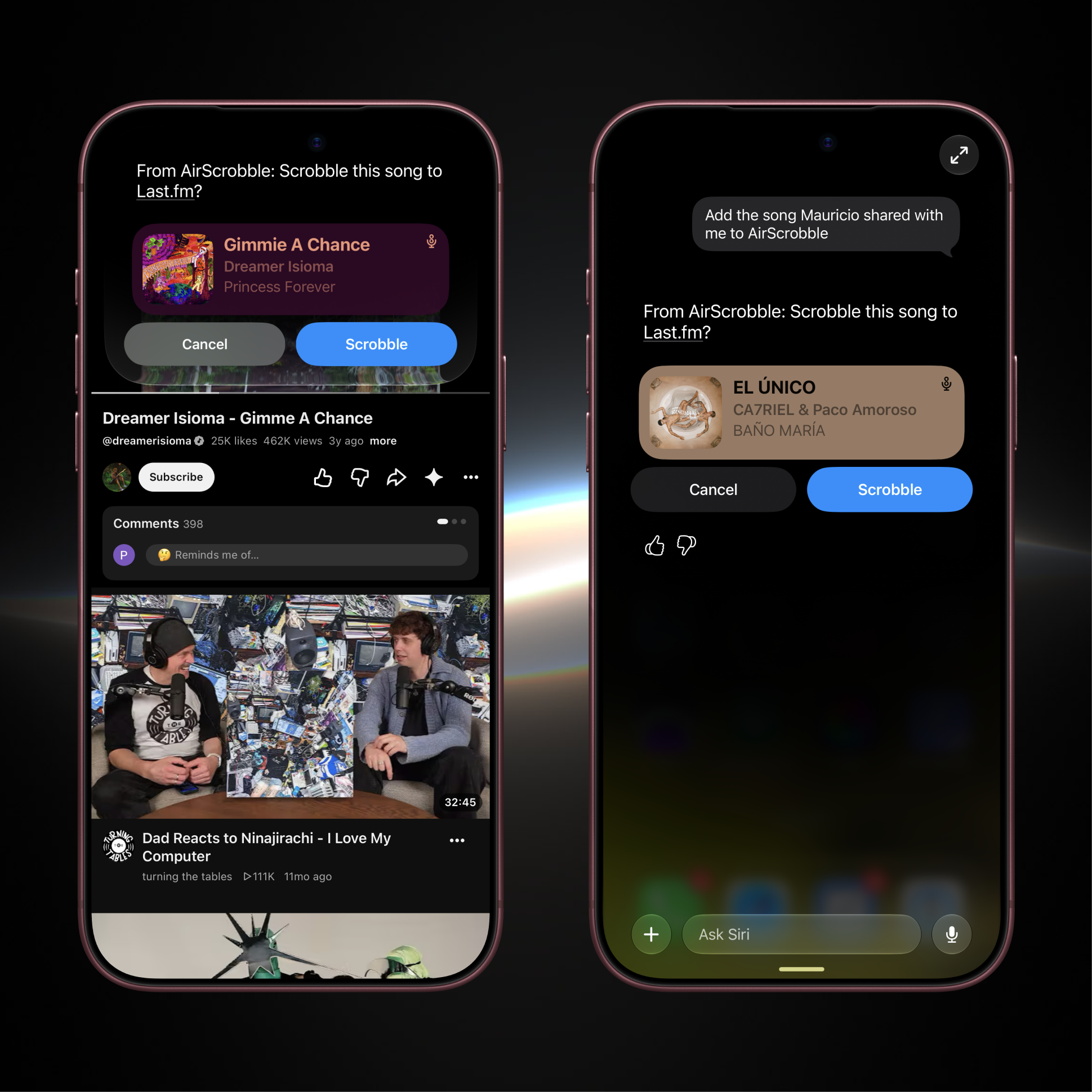
Scrobble songs with Siri
You can now say “Add this song to AirScrobble” to scrobble a song from what you’re looking at, such as a music video or a track a friend sent you! Siri will show you the song for confirmation before adding it to Last.fm, without needing to open the app.
Requires iOS 27 and a compatible device.
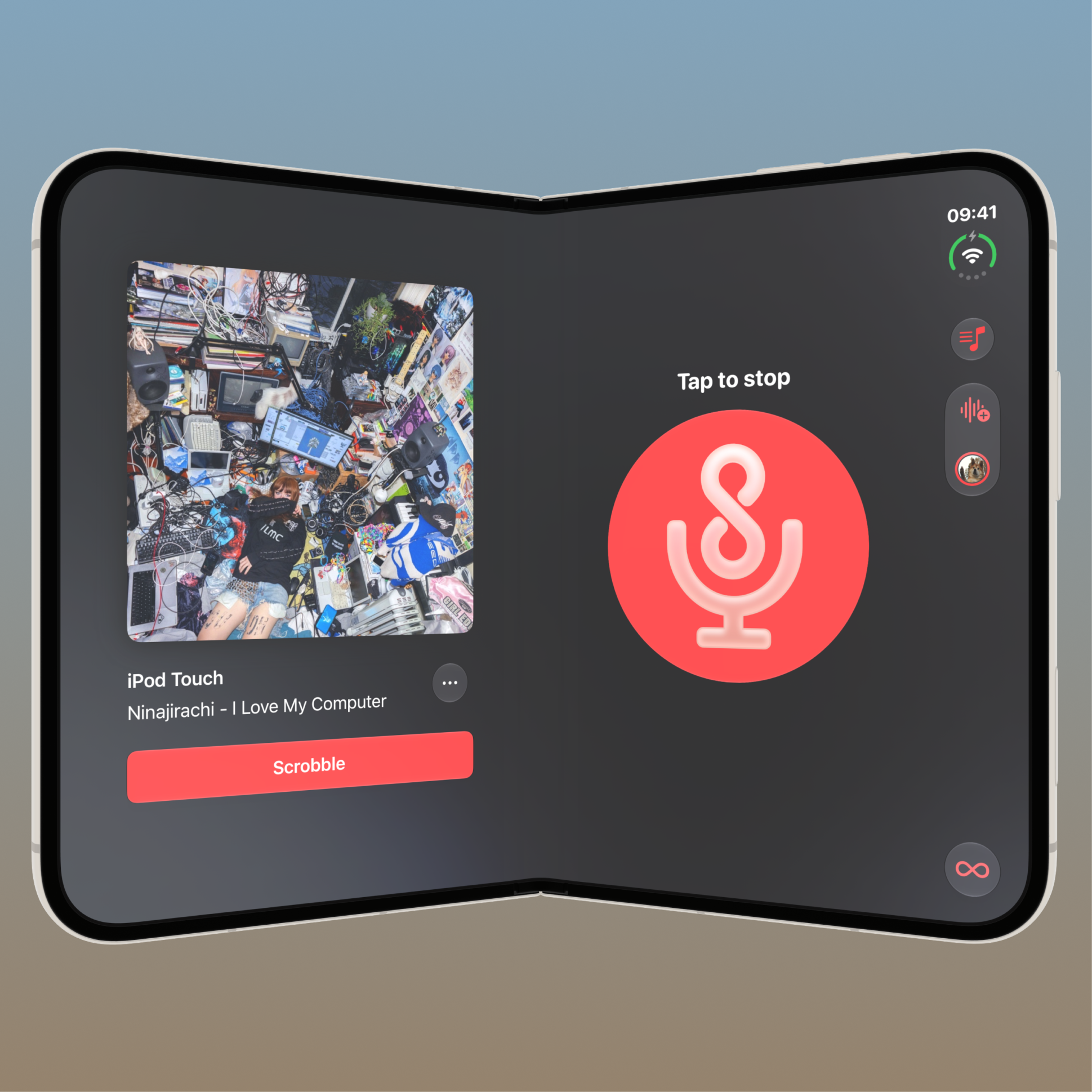
iPhone Duo support
AirScrobble has been adapted for iPhone Duo! You can view your history alongside the current song when unfolded, and the app adjusts its layout as you fold or rotate your device.
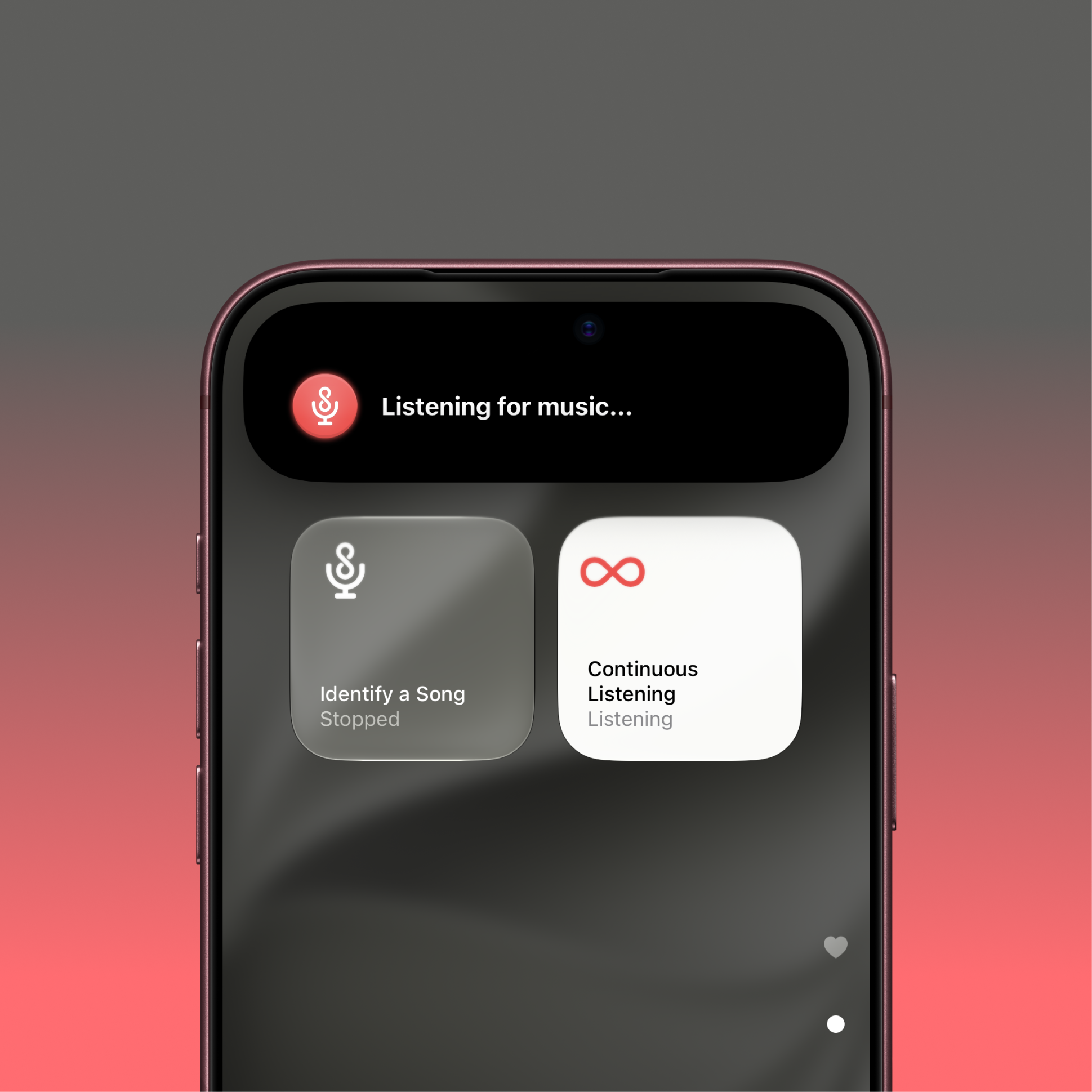
Continuous Listening improvements
Continuous Listening can once again identify songs playing on your iPhone or iPad, including through headphones and AirPods! You can also start and stop listening from Control Center, or use the new Start Continuous Listening action in Shortcuts to start a new session without opening the app.
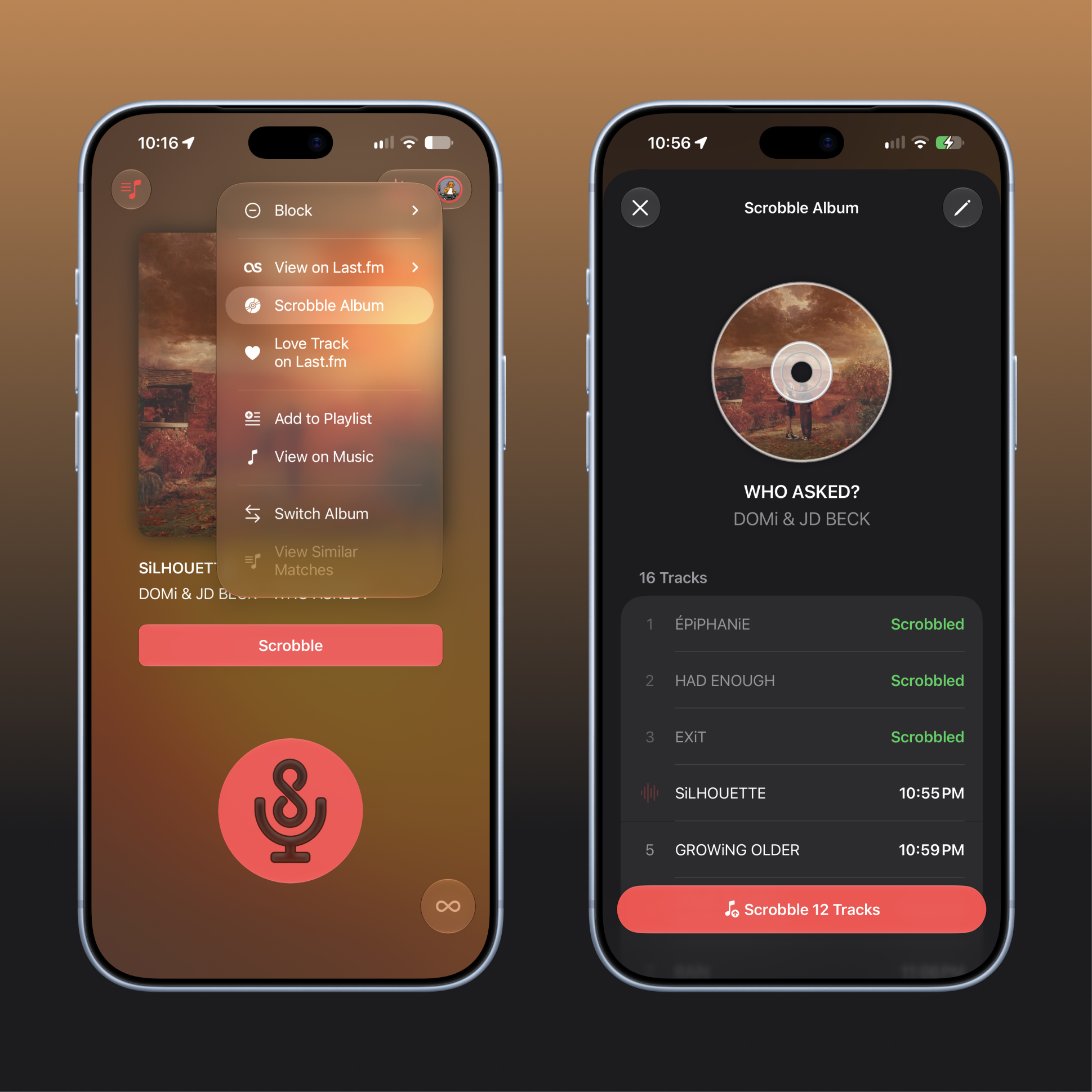
Scrobble entire albums
Listening to a full album? Match one of its songs and use Album Scrobbling to add the other tracks to Last.fm. You can choose which songs to include, and tracks you’ve already scrobbled will be skipped automatically.
The app calculates timestamps for each song, but you can also edit them yourself. Enable “Shift Other Tracks” when changing a timestamp to adjust the rest of the album along with it.
Requires AirScrobble+.
Find albums with Visual Intelligence
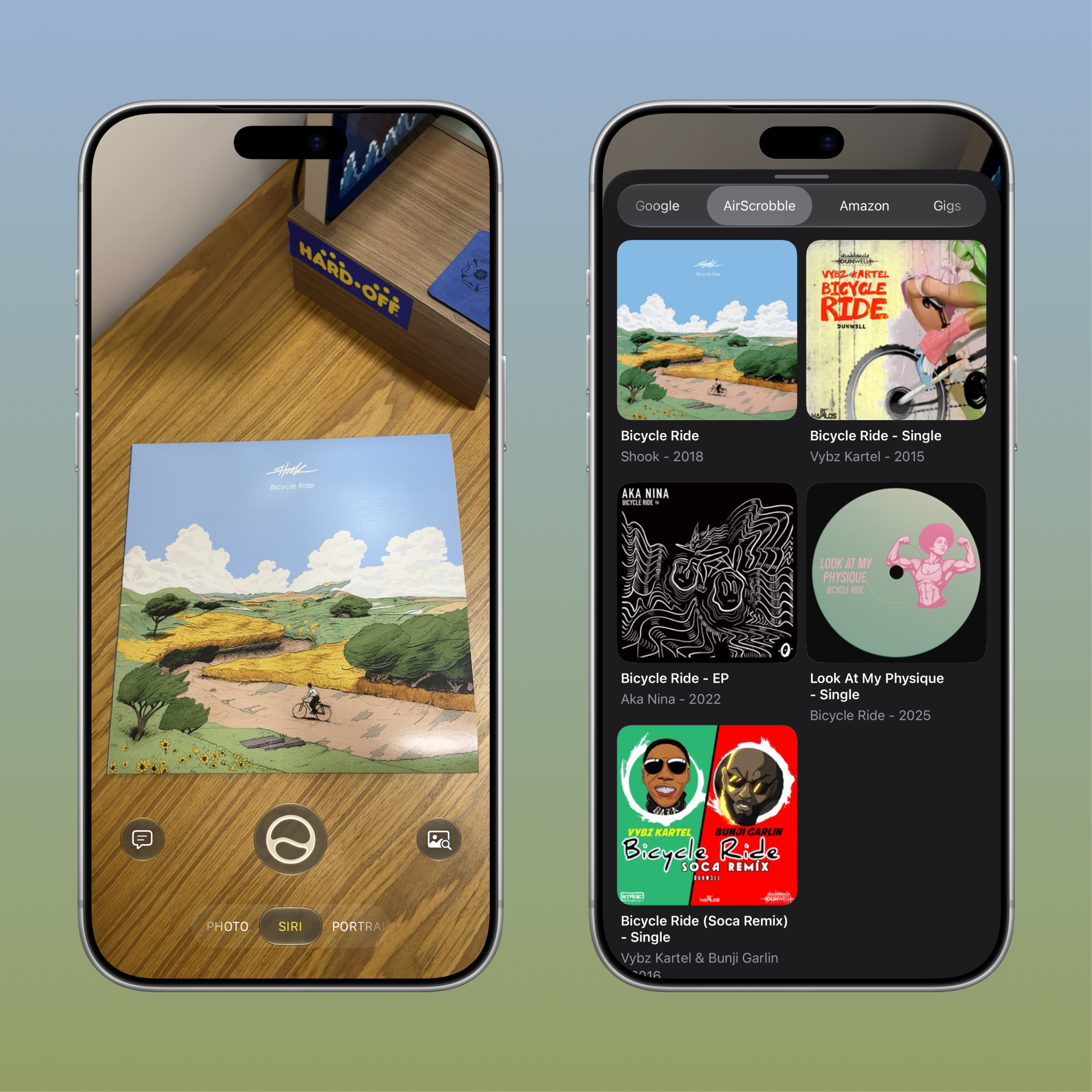
You can also use Visual Intelligence to find an album from its cover! Point your camera at the record, tap Search, and select AirScrobble to review and scrobble its tracks. If the cover isn’t recognized, try scanning the barcode on the back instead.
Requires iOS 26, a compatible device, and AirScrobble+.
Bug fixes
- Fixed issues with Live Activities showing the wrong sign-in status or staying active after listening stops.
- Improved scrobble status in History when Last.fm corrects a song’s metadata.
- Fixed account information not refreshing when signing in from another screen.
As always, if you need any help with the app or want to share what you’d like to see next, let me know at support@airscrobble.com!
Version 1.14.2
- Fixed an issue that could prevent Auto Match from activating the microphone for continuous listening.
Version 1.14.1
- Fixed Auto Match getting stuck on certain songs and failing to recognize new ones until restarted.
- Fixed the Auto Scrobble timer not resetting when a new song was matched.
- Fixed the Live Activity layout for songs without artwork.
- Fixed songs being scrobbled multiple times when using Auto Scrobble.
Version 1.14.0
- Block specific songs or entire artists from being recognized with the new Block List, available from the song menu and through Shortcuts.
- Use Switch Album to find other albums containing a matched song and scrobble the correct release.
- Clean up scrobbled metadata with filters for release tags, version labels, featured artist credits, and more.
- Enjoy a refreshed design for iOS 26 and Liquid Glass.
Version 1.13.0
- Added metadata filtering to clean up song titles, artist names, and album names before scrobbling.
- Fixed active AirScrobble+ members being prompted to upgrade when accessing premium features.
- Fixed multiple Live Activities stacking up when identifying one song at a time.
- Fixed a layout regression in the song title label.
Version 1.12.1
- Fixed a crash when discovering a song on iOS 17 and earlier.
- Fixed the Manual Scrobble shortcut ignoring a specified timestamp.
- Added an option to skip confirmation dialogs for Manual Scrobble and Set Now Playing shortcuts.
Version 1.12.0
- Restored Auto Match in the background and while the device is locked.
- In this release, Auto Match uses the device’s microphone, so songs must be audible to it; system audio and music playing through headphones or AirPods are not supported by Auto Match.
Version 1.11.2
- The published notes highlight the iOS 18 features introduced in version 1.11: Control Center controls, redesigned Live Activities, album artist preferences, and Live Activities on iPad.
Version 1.11.1
- The published notes repeat the version 1.11 features and fixes, including improvements to background Auto Match and Live Activity updates.
Version 1.11
- Start a single match or an Auto Match session from Control Center on iOS 18.
- Follow single matches and Auto Match sessions with redesigned Live Activities, including sessions started from Control Center, Siri, and Shortcuts.
- View matching Live Activities on Apple Watch and scrobble with a tap.
- Choose to scrobble with the album artist tag, with the track artist used automatically for compilation albums.
- Follow and scrobble discoveries from Live Activities on iPad.
- Fixed issues with Auto Match in the background and Live Activity updates.
Version 1.10.1
- Fixed the Auto Match Live Activity failing to update while using other apps or while the device was locked.
Version 1.10
- Identify and scrobble songs from videos in your camera roll, or open your discoveries in Apple Music.
- Start Auto Match with a new toggle below the Record button, alongside the existing press-and-hold gesture.
- Launch Auto Match directly from a new app icon Quick Action.
- Refreshed the main screen’s visuals and interactions.
- Fixed history scrobbles using the wrong timestamp, small buttons with unusually shaped artwork, and missing Auto Match banner notifications.
- Fixed matching updates after stopping Auto Match, rare crashes, and excessive battery usage.
Version 1.9.5
- Fixed an Auto Match Live Activity starting when canceling an automatic scrobble.
- Changed the age limit for scrobbling songs from 90 days to 14 days.
- Added limit and page parameters to more Shortcut actions and corrected action property typos.
Version 1.9.4
- Added an optional setting to keep the device awake during Auto Match.
- Improved the Record button’s feedback while listening.
- Fixed some Last.fm API Shortcut actions failing on iOS 17.1 and later.
Version 1.9.3
- Improved text contrast in Live Activities.
- Fixed Live Activities not ending when the app was closed.
- Fixed Manage Plan showing the previous subscription after upgrading to Lifetime.
Version 1.9.2
- Refreshed the Record button’s appearance.
- Added Manage Plan for AirScrobble+ and the ability to upgrade from a monthly or yearly subscription to Lifetime.
- Fixed blank Auto Match Live Activities and outdated Similar Matches lists.
- Fixed upgrade prompts appearing for existing AirScrobble+ members.
- Fixed Auto Match alerts reporting a scrobble when Auto Scrobble was turned off.
Version 1.9.1
- Improved Similar Tracks and fixed duplicate History entries when using Auto Match.
Version 1.9.0
- Added Similar Matches so you can choose the correct edit, remix, or version when Auto Match recognizes similar songs.
- Added Add from Journal on iOS 17.2 to bring recently heard songs, albums, and playlists into History for later scrobbling.
Version 1.8.4
- Fixed notification permission issues when switching between Auto Scrobble alert types.
Version 1.8.3
- Fixed Auto Match stopping and failing to restart in the background.
Version 1.8.2
- Added a Background Color setting to disable the colorful Auto Match Live Activity appearance.
- Fixed Auto Match unexpectedly stopping recognition on iOS 17.
Version 1.8.1
- Added an option to disable active Live Activity alerts when songs are matched or scrobbled.
- Fixed Auto Match rapidly switching between similar songs.
- Fixed Live Activity layouts in StandBy.
- Fixed upgrade prompts appearing for AirScrobble+ members starting Auto Match through the Start Matching Quick Action.
Version 1.8.0
- On iOS 17, added recognition of music playing on the device or in other apps, including through headphones and earbuds.
- Added a Scrobble button to Auto Match Live Activities on the Lock Screen and Dynamic Island.
- Enhanced the Match App Shortcut to identify and scrobble without opening the app, including from Spotlight, Shortcuts, and the Action Button.
- Included additional improvements and bug fixes.
Version 1.7.3
- Fixed Auto Match alerts failing to activate or switch between available alert types.
Version 1.7.2
- Fixed some songs being scrobbled more than once with Auto Scrobble enabled.
Version 1.7.1
- Improved the History list and included general improvements and bug fixes.
Version 1.7.0
- Added Shortcut actions for much of the Last.fm API, including profiles, tracks, artists, and trending music, with documentation for each action.
- Added new discoveries to your Shazam Library, accessible through Music Recognition in Control Center or the Shazam app.
- Improved Auto Match recognition reliability.
- Fixed duplicate History entries after iCloud sync and entries not being removed from iCloud when deleting all history or automatically deleting older entries.
Version 1.6.1
- Added indicators for activating Auto Match and for unsuccessful matches while a song is displayed.
- Added guidance when starting Auto Match during media playback, explaining that playback can be resumed without interrupting matching.
- Improved matching startup reliability while playing music or starting a phone call.
Version 1.6.0
- Brought AirScrobble to iPad with a layout that shows History alongside the latest discovery and adapts to multitasking.
- Added optional iCloud sync for History across iPhone and iPad.
- Added keyboard shortcuts for matching, scrobbling, and opening discoveries in Apple Music or Last.fm.
- Redesigned the Account page with more Last.fm profile information and support for animated avatars.
- Improved Auto Match alerts when microphone access is interrupted in the background.
Version 1.5.2
- Added a Lock Screen widget to quickly start matching.
- Added a setting to choose between Auto Match and single-song matching when starting from Siri, App Intents, Quick Actions, or the Lock Screen widget.
Version 1.5.1
- Fixed Auto Match being unavailable on iOS versions earlier than 16.1.
- Retained the new Auto Match alerts, banner notifications, and Last.fm and Apple Music links introduced in version 1.5.0.
Version 1.5.0
- Added active Live Activity alerts when Auto Match discovers or scrobbles songs.
- Added banner notifications, including support for devices without Live Activities, and a setting to choose the alert type.
- Added options to open the latest match or a History entry on Last.fm and to open History entries in Apple Music.
- Added a Skipped Scrobble status to the Auto Match Live Activity when canceling an automatic scrobble.
Version 1.4.4
- Added monthly and Lifetime purchase options for AirScrobble+.
- Fixed interruptions to playback on AirPods and Bluetooth speakers when listening for matches.
- Fixed the app failing to listen while the Record button was turned on.
Version 1.4.3
- Added batch scrobbling and deletion from History.
- Fixed Auto Match Live Activity layouts in the Dynamic Island.
- Fixed a rare crash when starting a matching session.
Version 1.4.2
- Improved VoiceOver navigation and announcements when matching starts and songs are identified.
Version 1.4.1
- Included the Auto Scrobble countdown, Now Playing support, and Shortcut improvements introduced in version 1.4.0.
- Fixed issues in the Shortcuts settings page and an incorrect final message from the Now Playing shortcut.
Version 1.4.0
- Added an Auto Scrobble countdown with options to cancel the scheduled scrobble or scrobble immediately.
- Added automatic Now Playing updates on Last.fm when a new song is matched, with an option to disable them.
- Added a Now Playing shortcut and optional album and Now Playing parameters to the Scrobble shortcut.
- Fixed AirScrobble+ features being inaccessible on slow connections.
Version 1.3.3
- Fixed scrobbling failures for songs with special characters in their metadata.
- Fixed a rare crash when starting a matching session.
Version 1.3.2
- Added Auto Add to Playlist to automatically save discoveries to the AirScrobble playlist in your Music library.
- Added a Live Activity alert when the system interrupts Auto Match.
- Fixed the paywall not closing after starting an Auto Match free trial and a layout issue in the minimal Dynamic Island view.
Version 1.3.0
- Introduced Auto Match: press and hold the Record button to identify songs continuously.
- Added Live Activities on iOS 16.1 and Dynamic Island support to follow the current song and its scrobbling status.
- Added a configurable delay before Auto Scrobble submits a newly matched song.
- Added an animated background when a song is identified.
Version 1.2.1
- Included the App Shortcuts introduced in version 1.2 for matching, History, scrobbling, and Loved Tracks.
- Improved album artwork blur for better readability when a song is identified.
Version 1.2
- Added App Shortcuts on iOS 16 to start matching or view History through Siri, Spotlight, and Shortcuts.
- Added actions to scrobble a song or add it to Loved Tracks on Last.fm from your own shortcuts and automations.
- Added a Shortcuts section in Settings to explore the available actions.
Version 1.1
AirScrobble 1.1: Like new songs and start matching faster
AirScrobble first update is now live, bringing a couple of new features that will help you start matching new discoveries faster and
Add new discoveries to Liked Tracks on Last.fm
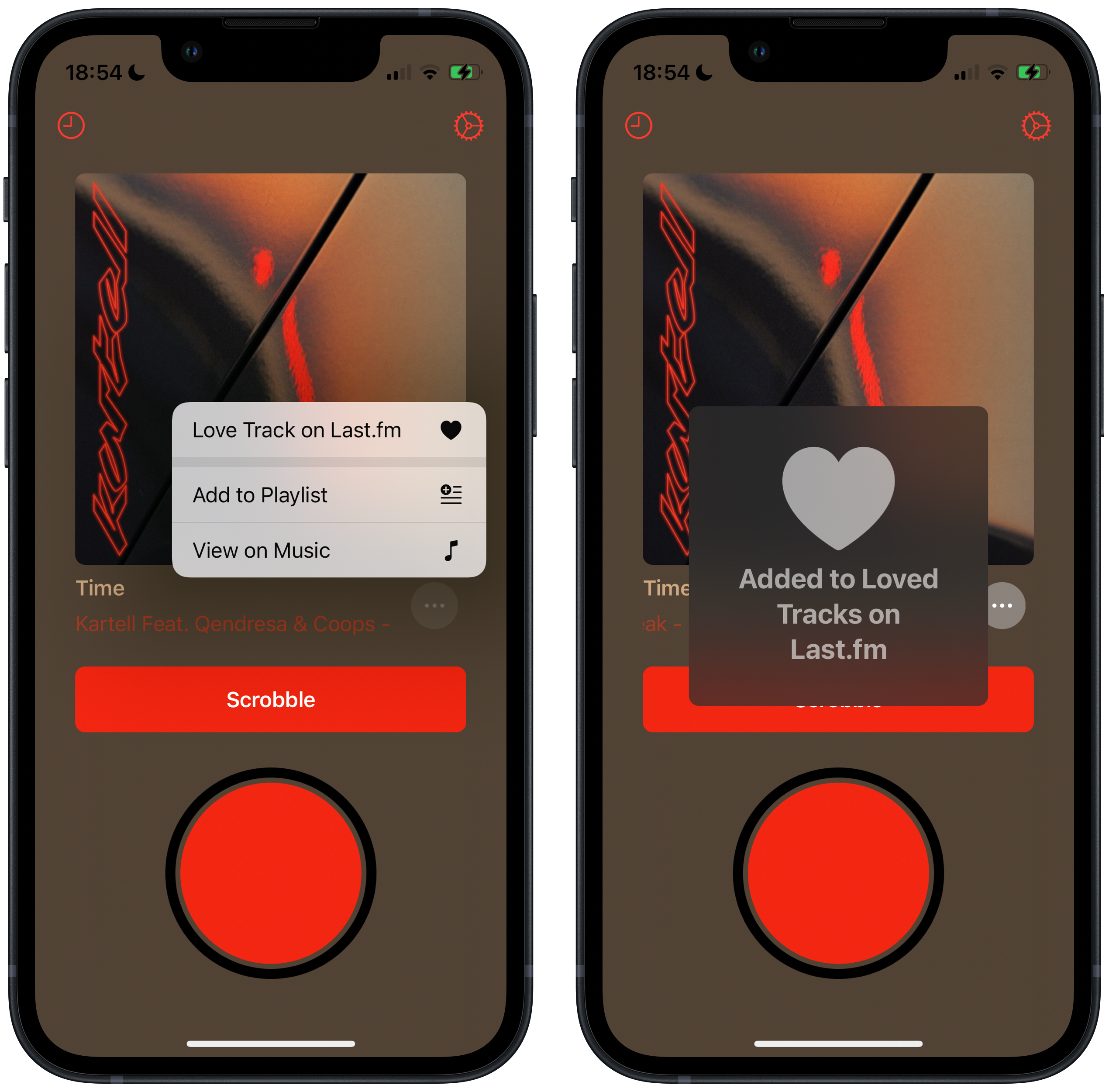
Heard a new song that instantly became your latest obsession? Now you can add any new matches to your Liked Track list on your Last.fm profile! Simply tap the ⋯ button and select the new Love Track on Last.fm option to add it to your faves. You can also double tap on the song’s artwork to like it!
Start matching or check your history with Quick Actions
Need to discover what’s playing around ASAP? Or want to remember what was that song that you got hooked on earlier in the day? With the newly added Quick Actions you can press and hold the app’s icon to access new shortcuts to access a feature as soon as the app opens! For this inital release, we are launching Quick Actions to start matching when opening the app and to access your history.
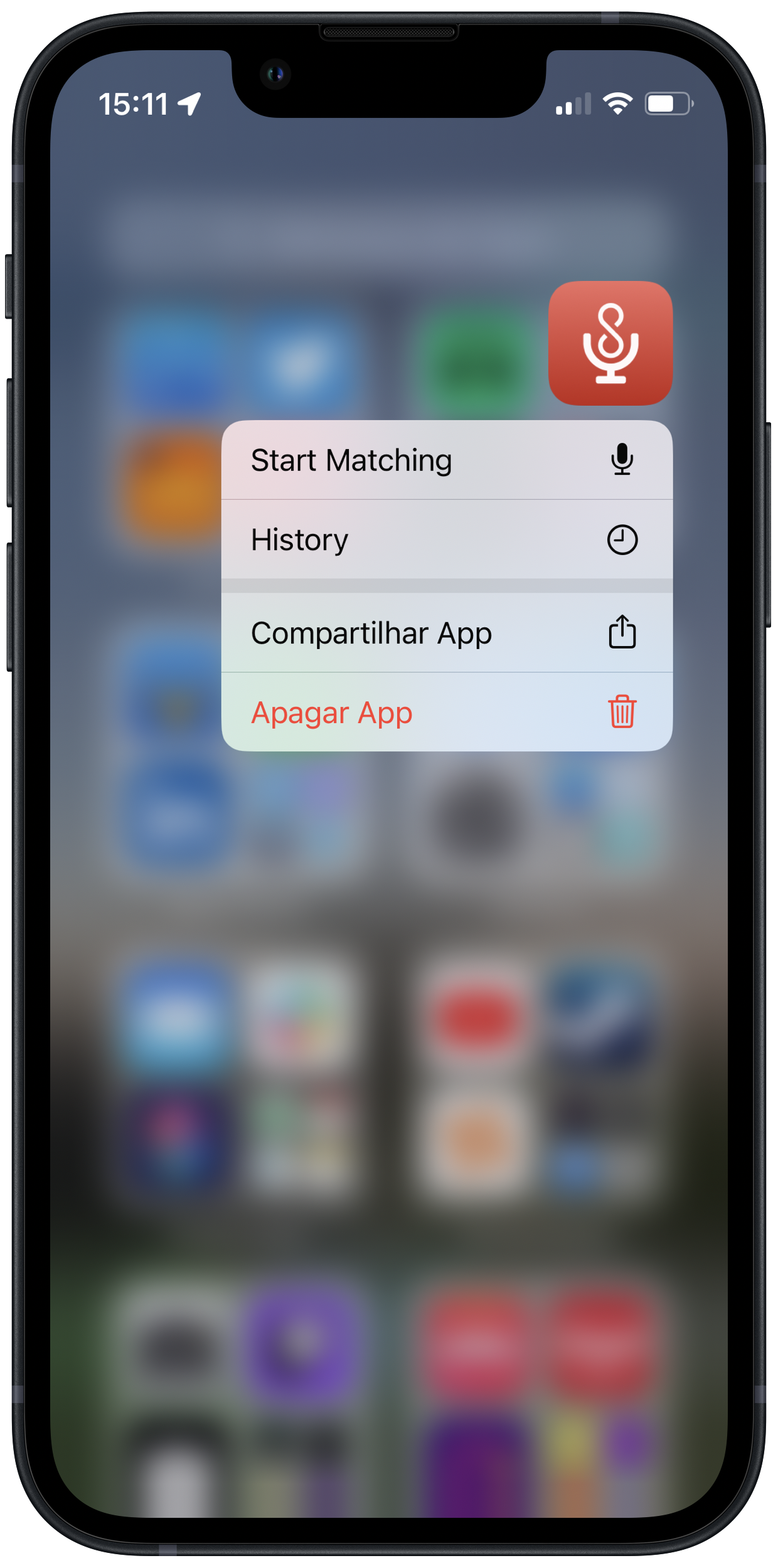
And for the powerusers out there, we are also exposing these shortcuts through a new URL scheme that’s been added with version 1.1! AirScrobble will use the airscrobble:// format and you can launch these quick actions with the following URLs:
airscrobble://matchto start matching upon opening the appairscrobble://historyto open the history page in the app
I hope you’ve been enjoying AirScrobble and hopefully this update will make you love it even more! If you’re feeling generous, consider leaving a review in the App Store!
As iOS 16 approaches, we’ll surely have some sweet new features for you early adopters out there. Stay tuned on our Twitter page to get some exclusive sneakpeeks 👀
Version 1.0.1
- Added Auto Scrobble to automatically scrobble new discoveries as soon as they are identified.
- Improved feedback when a song is scrobbled or added to a playlist.
- Fixed an issue that could prevent subscribing to AirScrobble+.
Initial Release
AirScrobble is now available in the App Store

I’m glad to announce that AirScrobble is finally available in the App Store! After months of working on my spare time, it’s great to finally put out this tool that has been quite helpful for me and I hope you find it useful as well!
I’ve shared the story behind the app on Product Hunt if you want to learn more about how this app came to be. Make sure you give it a look and show some support:

You can download AirScrobble here. Please let me know your thoguhts on @AirScrobble!
Pre-order
Now available for pre-order
AirScrobble is now open for pre-order at the App Store! Make sure you pre-save the app so you can get your hands on as soon as it releases this Sunday, August 21st!
Make sure you stay tuned on Twitter or check out our roadmap page to stay up to date on what we have planned going forward!
Beta
Version 1.0 (TestFlight build)
AirScrobble is currently under beta on TestFlight. On this inital release I am aiming to release the core feature of this app, which is beign able to identify a song playing around and to scrobble it on a Last.fm profile quickly. If you’re interested in joining the TestFlight, feel free to send us a message on our Twitter profile!